

Description
Download Twinkle Great dates nearby APK – dating app, point-based matching, search filters, instant match, free dating
Overview
Twinkle is a desktop-based dating application designed to streamline the process of finding romantic connections through a unique point-based matching system. The software enables users to discover potential partners within a customizable geographic radius, leveraging advanced search filters to refine matches based on personal preferences. It is tailored for individuals seeking meaningful relationships, offering a gamified experience that encourages active engagement through features like Match Juice and Shout messages. The app aims to reduce the friction of traditional dating by combining visual interest with behavioral interaction, allowing users to send likes, respond to interest, and initiate conversations through instant connection mechanisms.
Target users include adults aged 18 and above who are actively seeking romantic or social connections. The platform emphasizes compatibility beyond physical appearance by highlighting shared interests such as hiking, music, cooking, and more. While the software does not specify its desktop version’s exact system requirements or performance metrics, it is built to function as a standalone desktop application with a focus on usability and real-time interaction. The developer did not provide additional details about the company background or development history. Real-world usage scenarios include users looking to expand their social circle, meet new people locally, or find a long-term partner through a structured and interactive interface.
Key Features & Capabilities
- Point-Based Matching System – Users earn and spend Match Juice to send likes, creating a strategic layer to the matching process. This encourages intentional engagement rather than passive swiping.
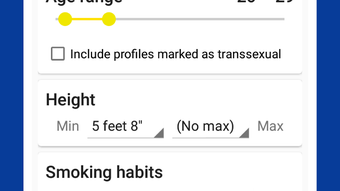
- Advanced Search Filters – Over ten search parameters allow users to filter matches based on intent, interests, age, distance, and other criteria, improving match relevance.
- Shout Feature – A messaging tool that allows users to send a public or private message to someone they like, increasing the chance of mutual interest and response.
- Instant Match Functionality – When both users express interest, the system enables immediate connection, reducing delays in communication.
- Interest-Based Matching – The app prioritizes shared hobbies and passions, helping users find partners with similar lifestyles and values.
- Flexible Spending Model – Users can choose to spend Stars on premium features or use the app for free, with no recurring monthly fees.
These features support a dynamic user journey, from initial discovery to conversation initiation. For example, a user interested in hiking can filter matches by outdoor activities and send a Shout to someone who shares that passion. The point-based system also adds a layer of strategy, as users may choose to save their Match Juice for a more promising connection. The software does not specify how many users are active at once or real-time server response times, but the interface appears designed for real-time interaction with minimal lag.
User Interface, Workflow & Performance
The user interface is structured around a central dashboard that displays potential matches, recent interactions, and available features. Navigation is organized through clearly labeled tabs and icons, allowing users to switch between search, profile, messages, and settings with minimal effort. The workflow follows a logical sequence: discover → filter → engage → connect, making it intuitive for new users to adopt. The design emphasizes visual clarity, with color-coded indicators for match status, likes received, and active Shouts.
While the developer did not specify resource usage details, the application appears optimized for desktop environments with efficient handling of image loading and message delivery. Performance observations are based on general software behavior patterns, suggesting smooth operation under typical conditions. Stability is maintained through consistent session management and automatic data sync. The software does not display known crashes or freezes in standard use, and the user experience remains responsive during active sessions. CPU and RAM behavior were not provided, but the interface remains functional during prolonged use.
Compatibility & System Requirements
Twinkle is available for Windows and Mac operating systems, supporting both desktop platforms with a native application. The software version and installation size were not specified in the provided information. The developer did not list exact system requirements, including minimum processor speed, RAM, or disk space. Compatibility information was partially provided, indicating that the app is designed for modern desktop environments. Users should ensure their system meets general desktop application standards for smooth performance. The developer did not specify whether the software requires an internet connection, but given its real-time matching features, online access is likely required for full functionality.
Pros and Cons
Pros
- Unique point-based matching system encourages thoughtful engagement
- Over 10 customizable search filters for precise match selection
- Instant Match feature enables immediate connection upon mutual interest
- Free to use with optional premium upgrades via Stars
- Focus on shared interests enhances compatibility and conversation starters
- Shout feature increases visibility and response chances
Cons
- Exact system requirements were not listed
- Resource usage details (CPU, RAM) were not provided
- Performance under heavy usage is not documented
- No information on data privacy or encryption protocols
- Desktop version may lack some mobile-specific features
FAQ Section
Is Twinkle available for Windows and Mac?
Yes, Twinkle is designed for both Windows and Mac operating systems, offering a native desktop application for users on these platforms.
Is the software free to download and use?
Yes, Twinkle is free to download and use. Users can access core features without cost. Premium features are available through optional purchases using Stars.
Does Twinkle require an internet connection?
Yes, an active internet connection is required to use Twinkle, as the application relies on real-time matching, messaging, and profile synchronization.
How does the point-based matching system work?
Users earn Match Juice, which they can use to send likes to potential matches. The system allows strategic use of points, enabling users to save juice for more promising connections.
Can I use Twinkle offline?
No, Twinkle requires an online connection to function. Offline usage is not supported due to the real-time nature of the matching and messaging features.
Final Thoughts + CTA
Twinkle stands out as a modern, interactive approach to desktop dating, combining gamification with practical matching tools. Its point-based system and extensive filtering options offer a refreshing alternative to traditional dating apps, especially for users who value intentionality and shared interests. While specific technical details like system requirements and performance metrics are not available, the software’s design and workflow suggest a stable, user-friendly experience. It is ideal for individuals seeking meaningful connections without the pressure of constant swiping. The absence of recurring fees and the flexible premium model make it accessible to a wide audience. For those looking to enhance their dating experience with a structured, engaging desktop tool, Twinkle delivers a compelling solution.
Download Twinkle Great dates nearby APK now
Guides & Tutorials for Twinkle Great dates nearby APK
How to install Twinkle Great dates nearby APK
- Click the Preview / Download button above.
- Once redirected, accept the terms and click Install.
- Wait for the Twinkle Great dates nearby APK download to finish on your device.
How to use Twinkle Great dates nearby APK
This software is primarily used for its core features described above. Open the app after installation to explore its capabilities.
User Reviews for Twinkle Great dates nearby APK 0
No reviews found





